
What Really Happens When You Upload a Video - A System Design Case Study
Inside the Invisible Architecture You Use Every Day - Understand why YouTube feels instant but Drive feels predictable.

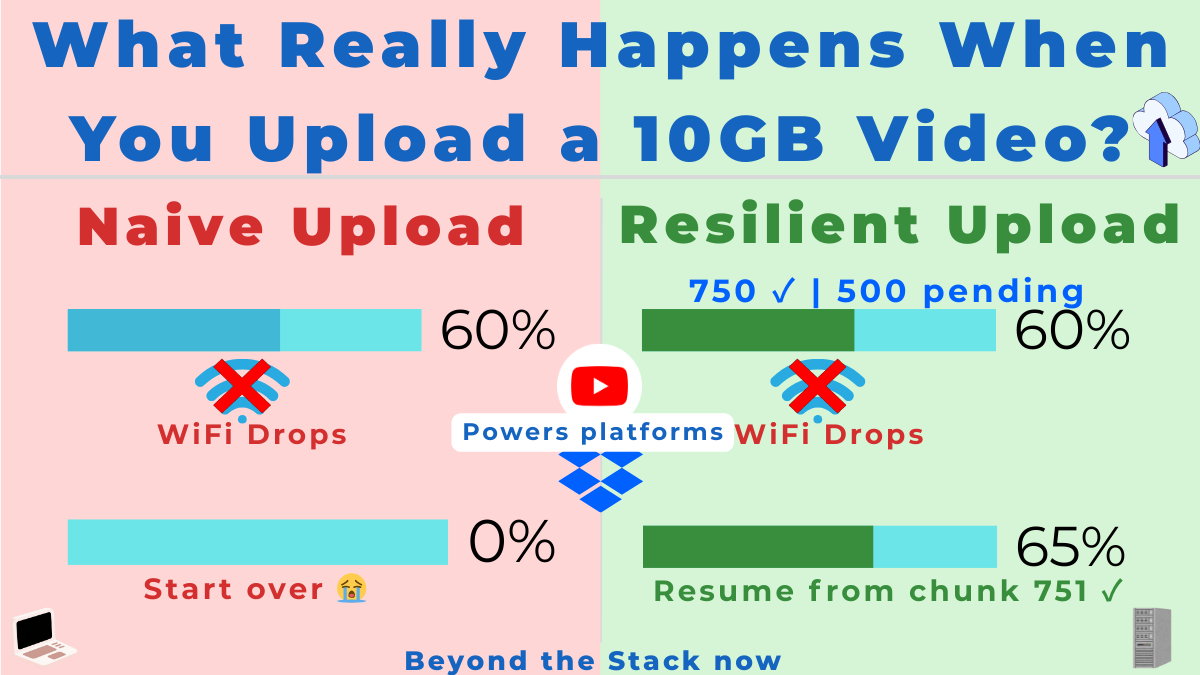
You’ve uploaded a 10GB video on flaky airport WiFi. Your flight boards. You close your laptop.
Hours later, on your phone, you tap ‘resume’ — and it just works.
That’s not magic. That’s one of the most resilient distributed systems ever designed, hiding in plain sight.
Here’s What You’ll Learn
Design upload flows that actually survive flaky mobile networks, browser crashes, and device switches.
Understand why YouTube feels “instant and intelligent” while Drive/Dropbox feels “consistent and predictable” for the same 10GB file.
Turn this mental model into an advantage in system design interviews and real production systems you build.
The secret: YouTube and Drive use identical upload architecture but completely different playback systems.
And just as upload architectures are shaped by constraints and failures, careers are shaped by unseen breakpoints — a theme explored in my e-book Breakpoints of a Career — The Untold Turning Points in a Software Engineer’s Life.
Let’s walk through it using the SYSTEM framework (a 6-step framework I introduced previously) that we use inside Beyond the Stack Now:
Synthesize → Yield → Structure → Test → Evaluate → Manifest
This is the loop architects run, consciously or not, whenever they design real systems at scale.
This post is one chapter in an ongoing series called SYSTEM for Architects — read the core framework here:
System Design Hands-On: 6-Step Discipline
Step 1: Synthesize – Why 10GB Uploads Are Hard?
In the Synthesize phase, architects zoom out and list every force that will break a naive design before it reaches production.
At first glance, uploading a 10GB file feels like a simple HTTP POST.
Real systems must handle:
Unstable mobile and Wi‑Fi networks that drop in the middle of large uploads.
Browser crashes, tab closes, and OS restarts.
Device switching between laptop, phone, and tablet.
Multi‑GB payloads for billions of users across the globe.
Resume support that works hours later without re-sending everything.
Adaptive parallel transfers that use available bandwidth without overloading servers.
Efficient, durable storage that does not explode in cost.
And this is true whether you’re uploading to:
YouTube (streaming-first)
Google Drive / Dropbox (storage-first)
The synthesis reveals:
Chunked, resumable, session-based uploads are the universal backbone of large-file handling.
But what happens after upload differs vastly between streaming platforms and storage platforms.
Step 2: Yield Scenarios – Streaming vs Storage Product goals
In the Yield phase, architects ask “what could this system become?” by contrasting different product goals and usage scenarios.
From an upload perspective:
A single HTTP POST cannot survive network breaks.
Browsers cannot hold 10GB in memory.
Resuming must work even after a reboot.
Uploads must continue across devices.
The server must not commit huge files blindly.
Parallelism must be adaptive.
From YouTube’s playback perspective:
Needs multiple resolutions.
Needs adaptive bitrate changing.
Needs CDN delivery.
Needs instant start and low-latency seeking.
From the Drive/Dropbox perspective:
Must preserve the original file.
Preview only needs 1 browser-friendly version.
No need for multi-resolution or adaptive streaming.
Yield phase clarifies:
Upload architecture must be robust and universal.
Playback architecture must be tailored to product goals.
Step 3: Structure Components – Upload Sessions, Chunks, and Maps
In the Structure phase, architects turn fuzzy requirements into concrete APIs, data contracts, and state machines.
Let’s design the APIs and the system architecture.
I. Initiate Upload Process
API - POST /upload/create
Headers:
 “content-type”: “application/json”,
 “auth-token”: “Token”
Body:
“filename”: “My Video”,
“size”: 11135333008
Purpose
Create a server-managed upload session.
Return upload rules + limits
Response
“sessionId”: “S123”,
“chunkSize”: 8388608,
“maxParallelUploads”: 6,
“maxRetries”: 5,
“ttl”: “24h”,
“uploadUrl”: “/upload/chunk/S123”
This is the moment the platform says:
“Okay, I’m ready with a logical upload session. Send your video in pieces.”
Note: The values you see here (8MB chunks, 6 parallel uploads, 5 retries, 24h TTL) are example settings, not magic constants — real systems tune these knobs based on infrastructure limits, user behavior, and cost/performance trade-offs.
II. Chunk Uploads (Parallel + Resumable)
Instead of sending 10GB in one go, the client (browser) splits it:
10GB file → 1250 chunks of 8MB each
Each chunk is uploaded separately and in parallel (Non-blocking HTTP Requests and follows Adaptive Parallel Upload - A Sliding Window Model)
API: PUT /upload/chunk/{session-id}
Headers:
“Content-Range”: “bytes 0-8388607/11135333008”,
“checksum”: "checksum",
“content-type”: “Binary”,
“auth-token”: “Token”
Body: Binary Data
Purpose
Network failure? Resume from the last chunk.
Parallel uploads are possible.
No memory overload on the server.
Fault tolerance.
Response
“sessionId”: “S123”,
“chunkId”: "C1"
This is the moment the platform says:
“Your Video upload is in UPLOADING.”
Note: It is useful to separate two ideas: “resumable uploads” and “client-side chunking + parallelism.”
Resumable uploads simply mean the server tracks progress for a session so the client can restart from where it left off, while client-side chunking and sliding-window parallelism are optimizations on the client to push multiple chunks concurrently.
Some platforms expose resumable upload APIs that work perfectly fine with sequential chunk uploads, without any aggressive client-side parallelism; the sliding-window pattern is a generalization you can adopt when you need more throughput.
III. Storage + Buffering Layer
On the server side:
Chunks are received by an Upload Service (API in Step 2)
Stored temporarily in:
Distributed File System
Temporary Object Storage
Or upload buffer queues.
Updates chunk-index map (a receipt showing which pieces arrived)
chunk_map = {
  0: received,
  1: received,
  2: received,
  3: missing
}
This map can live in:
Redis
Memory + WAL (Write-Ahead Log - crash-proof memory)
or DB
The map and the temporary object storage have a TTL (e.g., 24 hours).
Architect’s note: TTL is a design decision about when to ‘forget’ the temporary past.
These chunks are reassembled on the server side once all chunks arrive.
IV. Upload Complete
Once the client finishes sending all chunks:
API: POST /upload/complete?sessionId=S123
Purpose
Client information of the process.
Server verification of the uploads.
Reassembling the chunks into the final video for permanent blob storage.
Fault tolerance.
Clean up temporary blob storage + chunks map
For YouTube, this triggers:
multi-resolution transcoding
Segmentation into streaming chunks
Manifest generation
In reality, YouTube-style processing is a queued workflow/DAG of jobs (transcoding, segmenting, manifest generation, CDN pushes), not a single synchronous service call.
For Drive/Dropbox, only:
Generate a preview MP4 / an original file preview.
Generate thumbnail.
V. Parallel uploads from multiple devices
This is possible in YouTube-like systems.
Architect’s note: Treat uploads as server-owned sessions, not client-owned. That’s what unlocks multi-device continuation.
If Device A and Device B both know the same sessionId, they can upload chunks independently.
Once the upload session is created by a device, the other device can use the below API:
REST API: GET /upload/session/by-user
Server returns the active sessions for that user and allows the user to perform parallel uploads. No device binding needed.
But what if the same chunk is uploaded by multiple devices? That’s the conflict.
Here’s how the conflict gets handled by the Server:
If two devices upload the same chunk:
Server verifies chunk index + checksum.
First valid wins, duplicates ignored.
Architect’s note: Conflict resolution rules (like “first valid wins”) are policy decisions that trade off simplicity, correctness guarantees, and implementation cost.
VI. Watching The Video (Streaming) OR Downloading The File
Drive/Dropbox
Simple path:
File stored → Served through CDN → DownloadedDownload is still chunk-based (via HTTP range requests) but conceptually simple.
YouTube Streaming (More Complex)
A. Handshake between Client and Server (display)
Client → Server: (Give me details for this video)
API: GET /videos/{videoId}/display
Server returns from permanent DB:
Title, duration, thumbnail etc.
“videoId”: “VID123”,
“title”: “MY VIDEO”,
“duration”: ”20 mins",
"thumbnail": "cdn url for thumbnail.jpeg"
B. Handshake between Client and Server (play)
Client says something like:
“I am a mobile on 4G, my screen is 1080p, my network is moderate.”
API: GET /videos/{videoId}/play
Parameters
“resolution”: “1080p”,
“network-strength”: “moderate”
Server responds with:
A playlist (called manifest)
Which says:
Here are versions of this video:
144p
360p
720p
1080p
And each version is already chopped into small pieces (segments)
“videoId”: “VID123”,
“streamManifestUrl”: “/streams/VID123/manifest.m3u8”,
“availableQualities”: [”144p”,”360p”,”720p”,”1080p”]
Architect’s note: The manifest is the contract between your backend and the player; once you design it well, you can evolve the backend without changing every client.
Note: The video has ALREADY been transcoded into segments as part of upload process.
C. CDN delivery (Edge Streaming)
The video manifest file contains the chunk download (CDN URL) for each resolution.
The client picks the nearest available resolution and starts downloading chunks directly from the CDN URL (https://cdn.youtube.com/v/VID123/720p/seg42.ts)
DNS routes client to the nearest edge location.
D. Buffering + Adaptive Bitrate
Player maintains two buffers:
Playback buffer (currently playing)
Preload buffer (future segments)
Player:
Buffers 10–30 seconds
Measures network speed
Switches resolution dynamically
Downloads chunks ahead
This is Adaptive Bitrate Streaming (ABR).
Architect’s note: ABR moves intelligence to the client, so the server focuses on storing and serving segments while the player decides what to fetch next.
Step 4: Test and Trade Off — Failure Paths You Must Handle
In the Test phase, architects deliberately attack the design with failures and trade-offs before the real world does.
Failures are guaranteed.
They must be embraced, not feared.
What if a chunk fails even after retries?
Mark it missing
Session stays alive
Client retries later
What if the network dies?
Client resumes from missing chunks instead of starting from zero.
To do this, the client must know the upload session id and the missing chunks.
The client stores session details in browser-side cache such as Local Storage, Indexed DB, or Service Worker state.
The client can use the Server API to know the missing chunks.
API: GET /upload/status?sessionId=S123
The Server returns the missing chunks list, and
The client starts uploading the missing chunks.
This is the core power of resumable upload.
What if the Client cache is lost?
The session id still lives on the server.
The server exposes another REST API:
GET /upload/session/by-user.The server returns active sessions for that user and lets them resume the upload.
What if the session id is lost on the server as well?
Remember the TTL (for example, 24h).
After expiry, it’s a clean state restart by design.
The session expires when either the TTL is exceeded or the user explicitly cancels
What if Client interested in the resolution of the video is missing on the Server?
Client picks the nearest available quality.
What if the CDN Node is slow to deliver the video?
DNS / Anycast re-routes automatically.
This architecture is resilient under failure, scale, and concurrency.
Step 5: Evaluate the Design - Is This Architecture Good Enough?
In the Evaluate phase, architects step back and ask: “Is this design good enough for our current scale, cost, and complexity?”
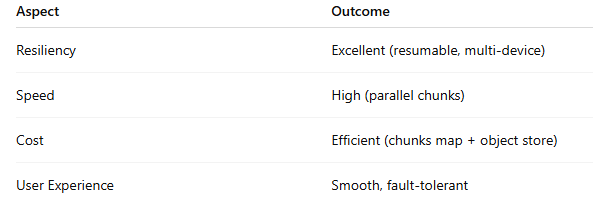
Upload Architecture Evaluation
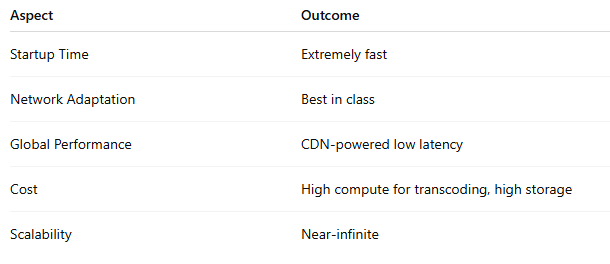
YouTube Playback Evaluation
Google Drive / Dropbox Evaluation
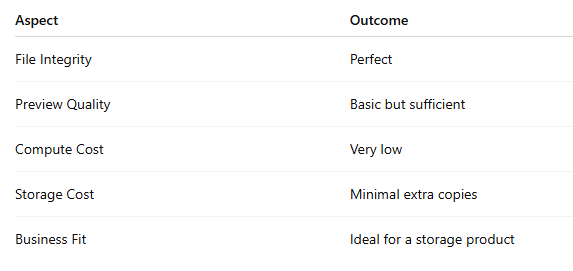
This phase makes it clear:
Different product goals require different after-upload pipelines.
Step 6: Map It Out — The Full System View for tap to play
In the Manifest phase, architects connect all the pieces into one end-to-end story from user action (tap) to system response (play).
Despite how different they look on the surface…
YouTube, Google Drive, and Dropbox share the same upload architecture:
Chunked uploads
Controlled parallelism
Resume support
Multi-device continuation
Temporary chunk storage
Final assembly
Because this is the ONLY scalable way to upload massive files for billions of users.
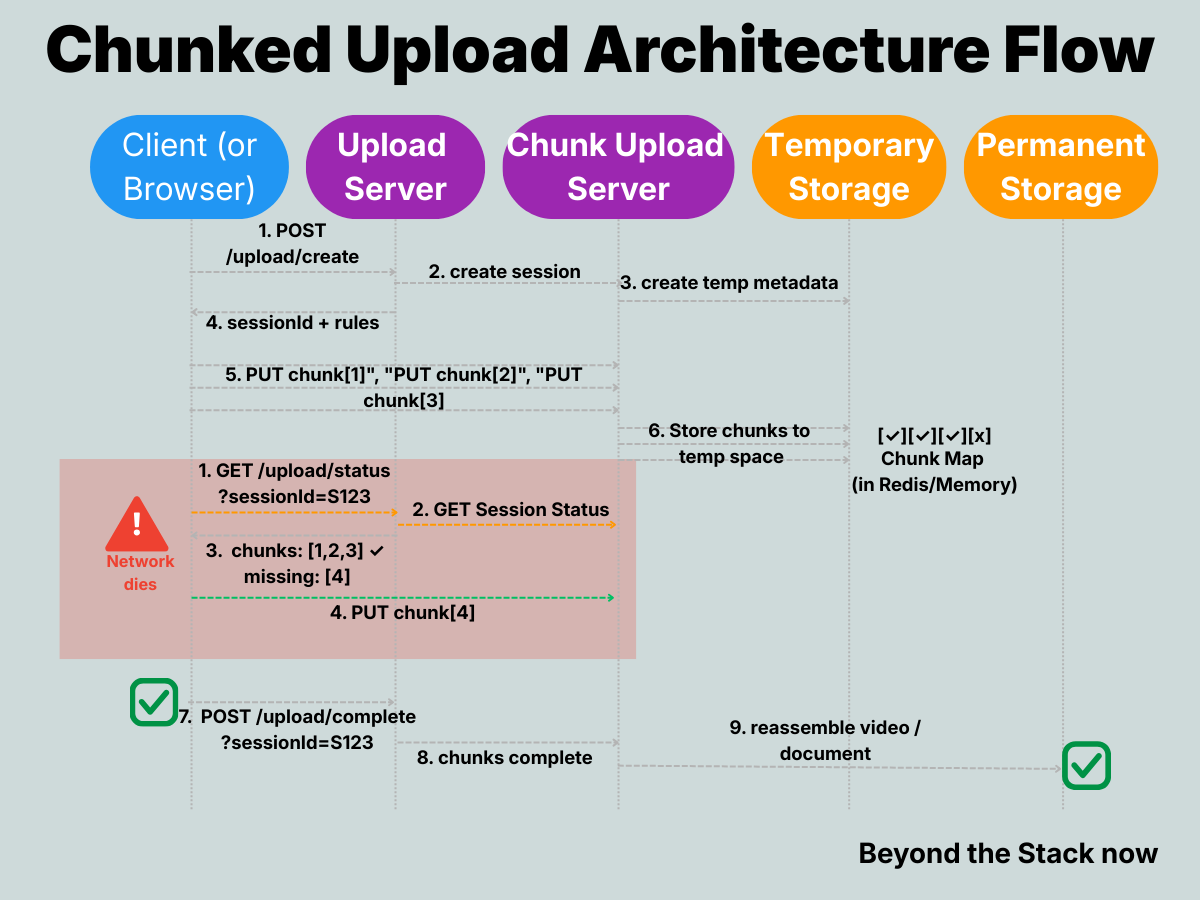
But after upload, their paths diverge:
🎬 YouTube becomes a streaming engine
multi-resolution transcoding
Segmenting
Manifest generation
CDN-driven adaptive delivery
📁 Drive/Dropbox stay storage-first
Save file
Generate simple preview
Serve the original file on download.
No adaptive streaming.
No multi-resolution copies.
No manifests.
The Split Second That Changes Everything
After the last chunk uploads, two paths diverge:
🎬 YouTube: ‘Quick, transcode this into 5 resolutions, chop it into 1000 pieces, and get it on CDN edge nodes NOW.’
📁 Drive: ‘Store it. Generate one preview. Done.’
Same input. Wildly different outputs.
That’s why YouTube feels instant, but Drive feels solid.
SYSTEM Design Interview Lessons
With this use-case study, you can unlock various interview questions:
How would you support resumable uploads for 10GB files over unstable mobile networks?
Explain why YouTube and Drive can share upload infrastructure but diverge after upload.
Design conflict resolution when two devices upload the same chunk for the same session.
Explain how YouTube supports clients to play a video at their choice of resolution.
💡 Pro tip: Bookmark this post. When you get “Design a video upload system” in your next interview, you’ll have the entire playbook ready.
Have you already seen these questions in interviews? Drop a comment with which one stumped you — or which one you absolutely nailed. Let’s compare notes.
Production Lessons
Three takeaways you can apply immediately:
Treat upload and playback as separate architectures with different SLAs
Your upload API needs 99.9% durability (don’t lose data), but can tolerate 10-second delays. Your playback API needs <200ms p99 latency but can retry on edge cache misses. Don’t force them into the same service.
Make resumability a first-class feature in your API design, not an afterthought.
If you’re building upload APIs today, start with session IDs and chunk maps from day one. Retrofitting resumability into a monolithic upload endpoint is 10x harder than building it from the start.
Use TTLs to cap your operational burden for orphaned sessions
Orphaned upload sessions will happen (browser crashes, forgotten tabs, abandoned flows). A 24-48 hour TTL means you don’t need complex garbage collection logic — the system self-heals. Just make sure you communicate the TTL to users upfront.
These aren’t just production best practices — they’re interview differentiators.
Think your team would find this useful? Share it — I’ve made this post public so anyone can read it, no subscription required.
Closing Thought: Systems Are Not Built — They Emerge
By walking through the SYSTEM loop, we realize:
Architectures are shaped by constraints, not imagination.
YouTube must be fast, global, and adaptive.
Drive must be accurate, reliable, and storage-efficient.
Different goals → Different architectures
Same upload path → Different playback paths
That’s the beauty of systems thinking.
If you’re an engineer who wants more real system walkthroughs like this from YouTube, Kafka, and distributed databases, subscribe to Beyond the Stack Now to receive new posts and support my work.
P.S. — On Career Breakpoints
Just as resilient architectures emerge from brutal constraints and failures, careers are forged in invisible breakpoints — those raw, career-altering moments no one talks about.
I’ve captured my pivotal ones in Breakpoints of a Career — unfiltered stories that built antifragility in chaos, production outages, and life pivots.
Read the first chapter free:
1️⃣ Global + Discounts – Gumroad
2️⃣ India UPI – Pothi.com

Read Next on the System Design Series:
This article is part of the System Design series on Beyond the Stack —
a collection of essays on architecture, reliability, scalability, and the decisions that matter after the code works.
Explore the full System Design series
https://beyondthestacknow.substack.com/t/system-design
These pieces focus less on tools and frameworks and more on how systems behave under load, failure, and growth.